
5
min read
BY
Bryan
Bowyer
Performance Engineer: Know thy Model
Even the most capable AI agent still needs human guidance

Introduction
The capabilities of agents to optimize models and kernels are growing in leaps and bounds. Even six months ago, we would not have considered running an agent over the weekend to track down a tricky functional bug or to work around some obscure kernel compiler failure. Today, we routinely talk about setting up for overnight runs. It has become almost too easy to “just give it to the agents”.
The problems arise when agents go down the wrong path. Agents tend to treat their inputs as ground truth instead of suggestions, leading to dead ends that can never work or infinite optimization loops. Sometimes we have needed to scrap a context and start over because an agent becomes "convinced" about a wrong path forward. When I worked in Electronic Design Automation we would complain that some tools you had to fight with to get the right answer. I feel the same about AI, and if you’re going to pick a fight with your AI, you better come prepared.
Introducing the Kernelize Charter Dashboard
At Kernelize, we build analysis tools so we can know when our agentic workflows have strayed from the path. We treat AI more like a script than a conversational user interface, sending commands and goals down through a complex mix of programs, scripts and agents. When things go wrong, the agents often give obscure and verbose answers about what happened. To avoid AI slop in our analysis, our analysis tools are not agentic and have concise and easy to understand information.
We have decided our analysis tools should be publicly available, starting with Kernelize Charter (kcharter), a dashboard for model structure and memory analysis. One of the first steps in our agentic workflow is to fit the model into device memory, kcharter gives hierarchical visualizations of the model and helps to understand graph structure and memory requirements.
To access kcharter, go to kernelize.ai and click on “Models” in the upper right corner. We are populating the public dashboard by running internal tools. We plan to open source the tools over the next few months. For now, if you’d like to see another model on the public dashboard, you can request it at model.request@kernelize.ai.
Understanding Qwen3.8-Flash-Next using kcharter
Here is a short kcharter walkthrough with the Qwen3.8-Flash-Next model. You can find the model card on the main https://charter.kernelize.ai/ page. Scroll down and click on the card to open model analysis.

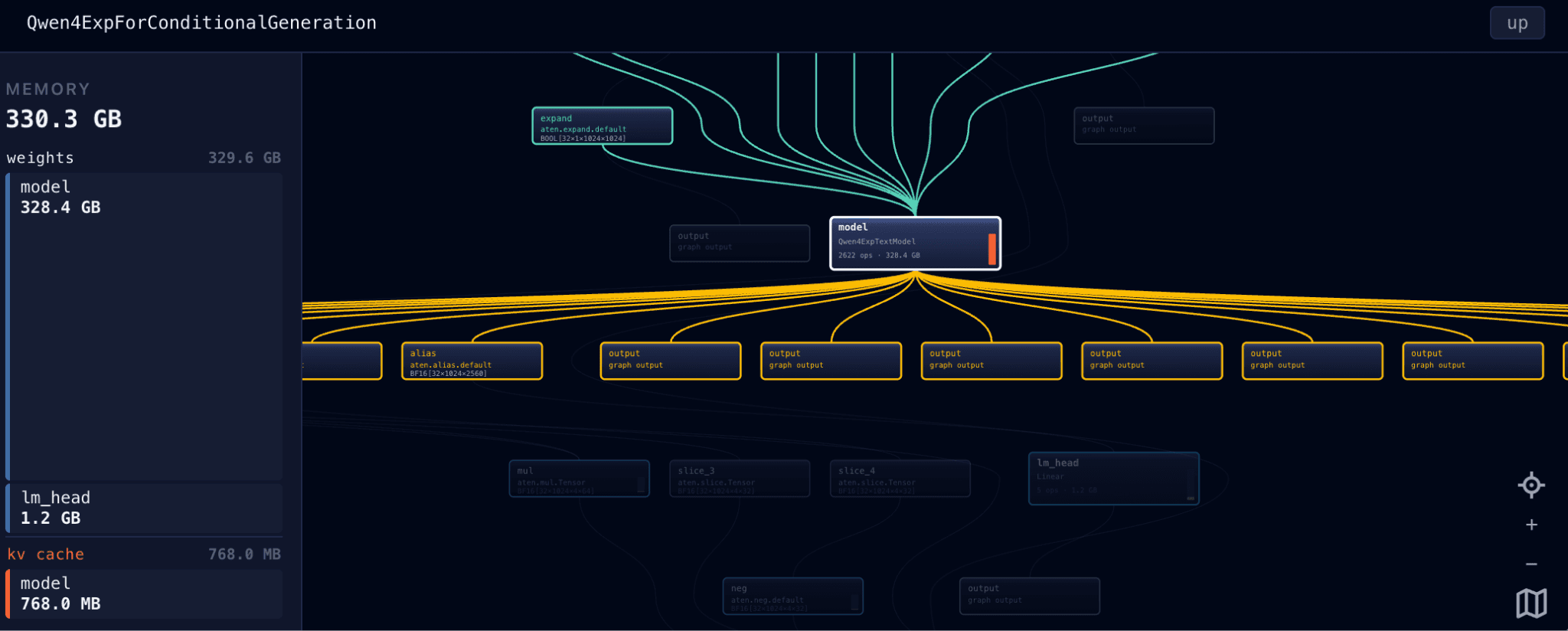
Once you click on the card, you should see something like the following:
https://charter.kernelize.ai/kcharter.html?doc=generated/Qwen3.8-Flash-Next.prefill.json#
Check the memory requirements on the left side of the screen. Only 768MB of KV cache is required because the context length is only 1K. Click in the upper right corner to adjust if you’re analyzing prefill or decode, the batch, current sequence length and max target sequence length, if desired.
You will see a red bar for parts of the model that consume the most time. Zoom in and find the “Model” object and double click on it to see inside the model. You can single click on an object to get more information.

https://charter.kernelize.ai/kcharter.html?doc=generated/Qwen3.8-Flash-Next.prefill.json#model
The most interesting part of the model is the layers. Double click on the layers to see how the core of the model is structured
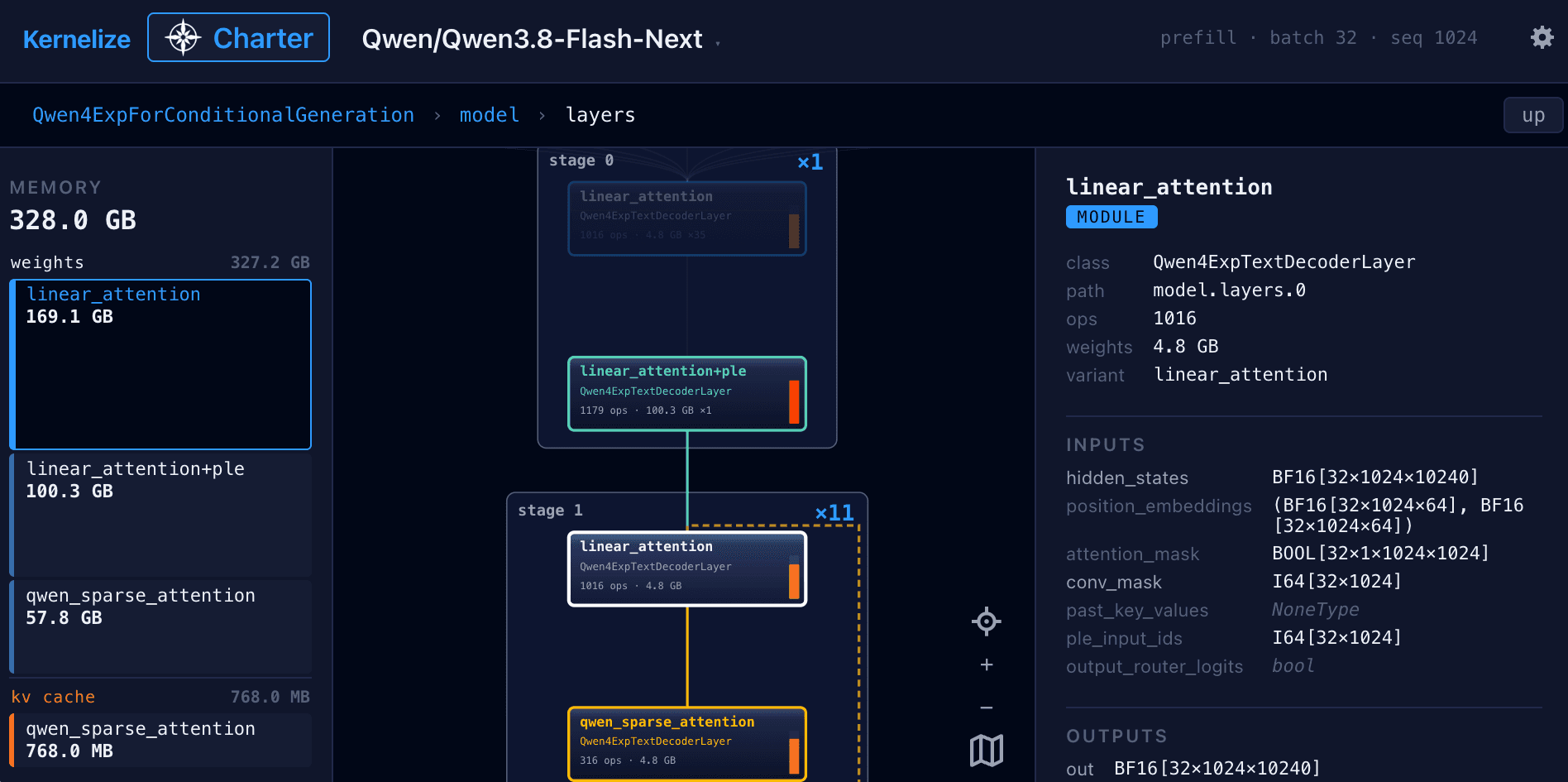
Now you can see the core model structure, Stage 0 with the new PLE layer, followed by 11 passes through Stage 1 with the new QWEN sparse attention and one pass through stage 2. The system allows you to drill down to the leaf nodes in the source graph, giving detailed information about both the layer in the model and its memory requirements.
More to come
Bringing up and optimizing a model requires detailed information about kernel to core mapping, data movement, kernel performance and much more. We will share more as we connect our tools to this dashboard. Over time, we plan to open source our analysis tools and allow anyone to easily add models to our dashboard. Feel free to reach out to us directly if you would like to know more: https://kernelize.ai/#form or contact@kernelize.ai.